Problem
When trying to login, application displays the following error: "Exception caught: 500 The call failed on the server".
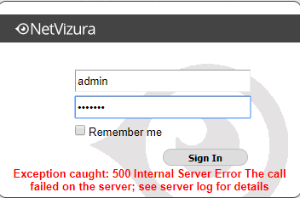
This can happen:
- if the browser window with the application stayed open during update
- if the browser session has expired or
- if database is not running.
If this method doesn't work, access the server via ssh and apply the following steps:
Linux
- Check the status of database
- Start the postgresql service
- Stop tomcat6 service
- Start tomcat6 service (to register the application on the database)
Debian 7 / Ubuntu 14 / Centos 6
service postgresql-9.5 status
service postgresql-9.5 start
service tomcat6 stop
service tomcat6 start
Centos 7
systemctl status postgresql-9.5systemctl start postgresql-9.5systemctl stop tomcatsystemctl start tomcat
Debian 8 / Ubuntu 16
systemctl status postgresqlsystemctl start postgresqlsystemctl stop tomcat7systemctl start tomcat7
Info
Names of Tomcat and PostgreSQL services in these article are an example. Check which version of these services are installed on your server and use those names in the commands listed above.
Windows
- Refresh browser (Ctrl+F5) and then log in again OR log out and log in manually.
If this doesn't work, do next:
- Start the postgresql service
In Windows Command Prompt or PowerShell execute the following command:net start postgresql-x64-9.5 - Restart tomcat service (to register the application on the database)
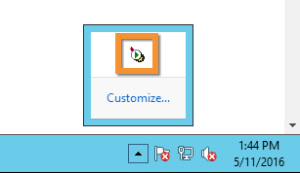
- Double click on Apache Tomcat Properties in system tray. In General tab, click Stop to stop tomcat service.
- Click Start to start tomcat service.
Info
Version 9.5 of PostgreSQL service in these article is an example. Check which version of this service is installed on your server and use this name in the commands listed above. For example, if you have installed Postgresql 9.4 the command 2b will be net stop postgresql-x64-9.4